 CN
CN
 JP
JP
 FR
FR
 ES
ES
 DE
DE
 NL
NL
 IT
IT
 PT
PT
 HI
HI
 UR
UR
 AR
AR
 BN
BN
 RU
RU
Asynchronous IO does more than overlap work. It changes the shape of time inside a system, making behaviours visible that synchronous code hides. Hidden waits become explicit. Accidental coupling shows up immediately. Backpressure appears as measurable queueing rather than blocked threads.
One value of asynchrony is it acts as a diagnostic tool. The moment two steps depend on each other, the dependency becomes visible because the event loop cannot progress until the awaited operation completes. What looked OK in synchronous code becomes an operational constraint you can now see, measure, and reason about.
The example below shows how Python async reshapes execution flow. A long‑lived call to the server yields instead of blocking, allowing the client to process the next image while the previous upload is still in flight. The result is not just a speedup of 6.7 times, it is a clearer picture of where your system is coupled, where it is IO‑bound, and where backpressure begins to form.
Backpressure is the situation where a service becomes overloaded, slowing down those that call in. In synchronous code, this slow down is communicated downstream to code that relies on the now slower process. Threads in the slower process block, no useful work can be done. The process seizes up. Synchrony has coupled the performance of the two processes together.
Backpressure is the system signalling "I am saturated", and it shows up as silence: growing waits, stalled pipelines, or accumulating tasks, rather than explicit errors. The system slows down before it falls over.
To get a handle on such errors in the asynchronous examples, OpenTelemetry spans
are included to show how observability aligns naturally with async boundaries.
Because each Python await is a structured yield point, tracing maps
directly onto the concurrency model.
Asynchrony: the fundamental idea
The fundamental idea is to put long-lived operations into a separate execution context so that other work can be progressed while waiting for the long-lived operation to complete.
In this way we overlap the completion of tasks. The long-lived execution is started, but the call to it returns immediately. The other work can then start.
It is important that the other work has no dependence on the long-lived work. This is necessary because if the second was dependent on the first, the first would have to complete before the second could be started. In this case, the two bodies of work would have to operate serially, not concurrently.
For concurrency to work, the work items must be independent of one another.
Our example
Our example is a long-lived RESTful call that receives client JPG data. During the long server wait, the client performs useful work preparing the next image file for upload.
In addition, observability support is shown by using OpenTelemetry, using a tracer and span to capture a timed, structured record of one operation. The observability for the client and server sides of the JPG processing are built by linking a span together.
A span is a timed, structured record of one operation. Client and server observability is built by linking many spans together.
Input/Output
Input/Output (IO) is a common operation that takes time. Your code might have to wait for:
- a remote service to return such as a payment provider or cloud storage
- a database query
- a large file to be read into memory
- machine learning inference
- Kafka partitions to respond
A Synchronous Approach
When programming synchronously, the thread that is executing must wait (block) for the entire IO operation. In a single threaded program, nothing else is getting done while you wait.
In a threaded program using a thread pool, long IO wait times makes it more likely that all threads block.
For example, in a pool of 32 threads, if the average blocking time is 2s and 32 requests are received within 2s, all 32 threads will be blocked. A 33rd request will have to wait on a thread becoming available. Queued requests inherit the delay.
If you have a downstream system waiting on the 32 requests completing, you now have back pressure building and being communicated around your distributed system.
The slow remote service is slowing down your downstream service which is likely to slow any other downsteam services, which could be a user interface, giving your end user a degraded experience.
In a synchronous system you want to give yourself a heads-up when production moves towards backpressure. Observability of wait times, configuration (the use of 32 threads as opposed to another number), and resource usage --- all 32 threads being occupied --- are important signals to track.
Using asynchrony
Python's asynchrony provides:
- The event loop — a scheduler within Python
- Coroutines — functions that can suspend and resume
- Tasks — scheduled coroutines managed by the event loop
- Await points — explicit yield boundaries where a coroutine gives up control of the thread to the event loop
The scheduler will resume tasks whenever the condition they were waiting for becomes true. IO readiness is one such condition.
You mark functions as asynchronous coroutines using async. Asynchronous
IO tasks are created with asyncio.create_task. await suspends the
current coroutine at an explicit yield point, returns control to the event
loop, and resumes the coroutine later when the awaited operation has completed.
Python asynchrony gives you concurrency, not parallelism
Concurrency is multiple units of work in progress at the same time. They may
or may not run simultaneously. This is what Python async gives you.
Parallelism is multiple units of work executing at the same time on different
CPU cores. Threads or processes give you this. async does not give
you this.
Python async gives you concurrency, but not simultaneous execution, because:
asyncioruns on one thread- the Python global interpreter lock (GIL) allows only one Python bytecode stream at a time
- the event loop schedules tasks cooperatively
async tasks overlap in time, but never execute at the same instant.
Python asynchrony is concurrency without parallelism.
You use create_task when you want concurrency. You use await when you want sequencing.
Operations that overlap in time
As we can overlap operations in time, we can reduce the total time it would take for a number of operations by performing some of these operations while a coroutine is waiting for IO to complete.
As a diagram, we have:
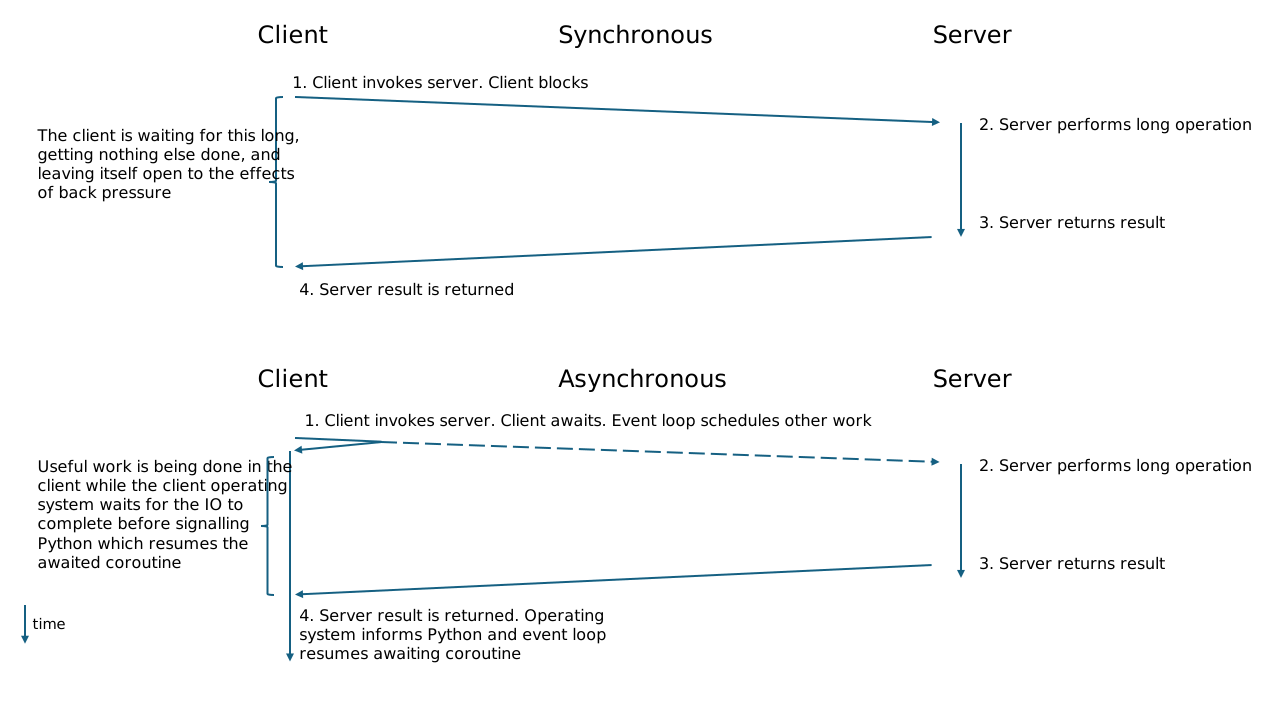
In the asynchronous case, the current coroutine executes upload() which
calls an asynchronous httpx.post operation. This coroutine suspends and
it will not run again until the awaited IO completes; meanwhile, the event
loop may run other coroutines if any are ready.
In this case, the awaited IO is the result from the server.
The Code
The example code consists of server.py and send.py.
The Server
The server code runs a FastAPI RESTful server that executes within
Uvicorn.
Uvicorn is an ASGI server written in Python, used to run asynchronous web frameworks like FastAPI and Starlette.
ASGI is the Asynchronous Server Gateway Interface. This is the modern, async‑native standard that defines how Python web servers (like Uvicorn) talk to async web frameworks, such as FastAPI.
app = FastAPI(lifespan=lifespan)

@app.post("/receive_upload")
async def receive_upload(request: Request,
                         file: UploadFile = File(required=True)):
    tracer = request.app.state.tracer
    with tracer.start_as_current_span("upload",
                                      context=extract(request.headers)):
        # 'file' has a reference to the underlying file, in a temporary file.
        # Reading this could be a lot of bytes. Recommendation is to read
        # with: contents = await file.read()

        print(file.filename)

        wait_time = random.randint(5, 15)
        await asyncio.sleep(wait_time)
        return {"status": wait_time}

if __name__ == "__main__":
    uvicorn.run("server:app", host="127.0.0.1",
                port=int(sys.argv[1]), reload=False)
We start the webserver by calling run on uvicorn with the FastAPI
application, known as server:app. server is the name of the
module.
The port that uvicorn will listen on (that will form the endpoint for the
client) is passed at run-time appearing in sys. Uvicorn reload is
explicitly set to false. If this is true, uvicorn will restart the server
whenever it detects that the server.py file has changed. Automatic reload
is convenient when testing but a risk when we want to create a stable
environment.
A long-lived server call is simulated by waiting a random number of seconds, between 5 and fifteen.
The wait calls asyncio.sleep because a call to time..sleep would
suspend not only the coroutine, but the event loop and all IO notification.
Nothing would happen for the duration of the sleep. There would be no
concurrency.
Once the asynchronous sleep has returned, `receive_upload returns a simple JSON
status result.
The Client
The client is where time is saved by overlapping the previous upload with work processing data for the next upload.
async def main():
    tasks = []
    start = time.perf_counter_ns()
    server_port = sys.argv[1]
    containing_zip = sys.argv[2]

    for filen in range(1, 11):
        print(filen)
        filename, buffer = get_file(containing_zip, filen)
        if is_jpeg(buffer):
            img = to_image(buffer)
            img = resize_image(img)
            img = centre_crop(img)
            img = strip_metadata(img)
            preview = generate_preview(img)

            compressed_bytes = compress_image(img, fmt="JPEG", quality=80)

            img_data = to_bytes(img)
            meta = read_exif(img_data)
            tasks.append(asyncio.create_task(upload(filename, img_data, server_port)))
            # await upload(filename, img_data, server_port) # synchronous call
main is marked async as it contains asynchronous code: the call to
upload.
To demonstrate the time that can be saved asynchronously, the loop uploads the
first 10 files from the containing ZIP file. This ZIP and its contents are from
https://github.com/yavuzceliker/sample-images.
File 1 is processed and uploaded asynchronously, so the loop immediately returns to the top
to start loading file 2 into buffer.
The buffer is checked to confirm the file format is JPG before processing that
image with resize_image and others.
The image is converted to a preview to show that such work can be done at the client and the image is compressed to highlight the difference in size as an 80% quality image may be appropriate to upload for some. Any EXIF tags are read as a client-side operation, ready for upload, should that be required: demonstrating how work can be offloaded from the server to an asynchronous client.
Once processed, img_data is uploaded asynchronously.
Asynchrony is achieved with:
tasks.append(asyncio.create_task(upload(filename, img_data, server_port)))
We retain a reference to the Task that is created by asyncio.create_task.
This is so we can subsequently wait for all tasks to complete via asynio.gather.
The line await upload is the synchronous call. This is used to compare performance
below.
Upload
infile is the name of the JPG file from the ZIP. data is the
processed bytes and server_port is the port the Univcorn server is
listening on.
async def upload(infile, data, server_port):
    tracer = trace.get_tracer("send.py")

    with tracer.start_as_current_span("upload"):
        upload_url = f'http://127.0.0.1:{server_port}/receive_upload'

        files = {"file": (infile, data, "application/octet-stream")}

        async with httpx.AsyncClient(timeout=None) as client:
            try:
                headers = {}
                inject(headers)
                response = await client.post(upload_url,
                                             files=files,
                                             headers=headers)

                return True
            except httpx.HTTPError as exc:
                return False
To POST to the server, upload_url is formed, as is files which is
the Octet-stream of the JPG data.
Observability
The client upload code uses a tracer to create a span for the upload
operation. A span is the fundamental unit of work that you want to observe. You
can use a span in multiple processes.
The mechanism that supports this is the call to OpenTelemetry's inject
that loads observability span data into a dictionary (headers) that is
passed as HTTP headers during the POST.
This is accessed like this on the server side:
@app.post("/receive_upload")
async def receive_upload(request: Request,
                         file: UploadFile = File(required=True)):
    tracer = request.app.state.tracer
tracer is loaded from the request. It contains the information provided
at the client with inject.
Running the Code
First of all we start the server with:
python3.9 server.py 8000
...
INFO:     Uvicorn running on http://127.0.0.1:8000 (Press CTRL+C to quit)
Then we run the client to send the image files.
# python3.9 send.py 8000 images/main.zip
1
2
3
4
5
6
7
8
9
10
14555048979
You will see 1 to 10 printed out, representing the 1st, 2nd, 3rd, ..., file uploaded. The large number at the end is the elapsed time to upload all ten files in nanoseconds. 14555048979ns is 14.5 seconds.
Note, the client does not terminate on its own.
Preparing to run a synchronous version
Update async def main in server.py so that the line:
#tasks.append(asyncio.create_task(upload(filename, img_data, server_port)))
is commented out, and that the line below it, which is:
await upload(filename, img_data, server_port)
is not commented out: it is initially.
Running the client
There is no need to rerun the server.
This time, when you run the client:
# python3.9 send.py 8000 images/main.zip
The 1, 2, 3 will appear but it will take longer, as 1 has to complete before
2 is started.
The full time to upload ten files in the synchronous case is 97603426760ns which is 97.6 seconds or 1 minute 37.6 seconds. This is 6.7 times slower that the asynchronous version for the same amount of work, processing and uploading 10 images.
Conclusion
Structural Effects on Execution Flow
When you introduce concurrency, any unseen dependency between steps becomes immediately visible because you cannot use it. This means asynchronous design is a diagnostic tool: it reveals coupling you did not know you had.
Once IO wait time is removed, the limiting factor becomes how efficiently you schedule, batch, and pipeline work. The system’s ceiling moves from "how fast is the remote services" to "how well do you structure the work".
When using await, you are marking a cooperative yield point. This forces
you to identify which parts of your pipeline are IO‑bound and which are
CPU‑bound. This separation is rarely visible in synchronous code, where
everything looks uniform.
Because each await is a boundary, asynchronous code decomposes into
smaller operations. This improves testability and reduces how far errors can
travel.
The client performs image processing before upload. This is not just an optimisation; it is a design pattern. Asynchronous architectures naturally push work outward, reducing server load and improving system resilience.
System‑Level Behaviour and Operational Consequences
The example shows a 6.7× speedup, but the deeper effect is that latency variance is masked. Asynchronous systems degrade more gracefully under load because they do not accumulate blocked threads.
Because Python cooperative concurrency code already has explicit yield points and structured tasks, observability spans map naturally onto the program’s execution model. The tracing model aligns with the concurrency model, reducing instrumentation friction.
Once work is concurrent: cancellation, retries, and partial progress become normal. Asynchronous design implicitly pushes you toward idempotent operations and stateless boundaries. Idempotent means an operation that is "safe to run more than once". If an operation is not safe in this way you will produce corruption, duplication, or inconsistent system state.
In synchronous systems, backpressure appears as blocked threads. In asynchronous systems, it appears as queued tasks. This makes it measurable, observable, and tunable rather than a pathological failure mode where blocked threads you cannot reason about make the program appear stalled.
Failures no longer cascade through blocked threads; they propagate through task graphs. This changes how you reason about retries, timeouts, and cancellation.
Download the code
Related Articles
- The Limits of Stateless LLMs
- The Myth of Complete Specifications
- Why Junior Engineers Matter More as AI Expands
- Agents Cannot Maintain Systems: The Additive-Transformative Gap in LLM Software Delivery
- Vibe Coding Is Not Engineering
Read next: Latency is architectural
Most latency comes from retrieval hops and orchestration.
Your Comments
Please enter a nickname. You do not need to register. A nickname is only required the first time you comment.